OCR’ing 100,000 pages with open-source VLMs on Modal
We OCR'd 100,000 pages with open-source vision-language models in <1hr for $223, roughly 9–27× cheaper than the comparable-quality proprietary APIs.
We wanted to answer a simple question: what does it actually take to OCR a large document corpus using open-source vision-language models?
We picked a workload of 100,000 pages. That number was mostly arbitrary, but it was large enough to be interesting, and large enough that we had to figure out how to make it not a financially ruinous endeavor.
tl;dr - three things that surprised us:
- Self-hosting open-source OCR is cheaper and far less painful than you might think. Our full 100k-page run with
dots.ocr-1.5finished in 56.5 minutes for $223 — about $2.27 per 1,000 pages. Staging weights, renting GPUs, and standing up the serving stack took hours, not days; Modal did most of the heavy lifting, and we never touched a CUDA driver or a container registry. - The cheapest GPU per second may be the slowest to finish and unacceptable at scale. An
L4can land in the same dollars-per-page band as anH100while taking 5–6× longer to drain the queue. Your SLA matters as much as the spreadsheet. - Benchmark your workload, not the leaderboard. Two public-ranking favorites lost once we measured them on the shape of our data.
This post is for engineers, technical founders, and anyone who has mostly lived on hosted APIs from the big model providers and wants a concrete sense of what self-hosting actually looks like in practice.
Why open-source models?
Control, cost, and quality that is good enough for the vast majority of document workflows. We focused on VLMs (rather than text-only OCR) because real documents are messy: handwritten forms, scanned PDFs, awkward multi-column layouts, and text baked into images all break naive text extraction.
Running your own model turns a fixed price sheet into a set of knobs. The weights, serving engine, batch strategy, GPU type, and quantization are all yours to tune. You stop paying a per-token markup and start paying for GPU-seconds, which flips the economics once volume is non-trivial.
There’s a strategic angle too, and it’s the one that’s easy to underweight until it bites you. If a hosted API is the foundation of your product, you don’t own the cost curve, the model lifecycle, or the deployment path. Prices move, default models change underneath you, and the exact model you tuned around can be deprecated on the vendor’s schedule, not yours. Self-hosting trades convenience for control over the variables that matter in production.
The three axes that matter
Everything below comes back to three measurements:
- Throughput — pages per second per GPU. Sets wall-clock time and how many GPUs you need.
- Cost — dollars per page. Sets whether the project is viable at scale.
- Quality — does the model actually read the page right? A page OCR’d cheaply is worthless if it silently garbles the text. We treat this qualitatively (more on why in Model Selection) and ship a viewer so you can check our work.
We’ll take them roughly in the order they mattered to us: which model, then how fast and how cheap, then how close to correct, and finally how all of that stacks up against the proprietary APIs.
Who we are
We’re the founders of Redspring, an AI and product-development consultancy. We build applied ML systems, including large-scale document and data processing, so this was equal parts client-relevant and an excuse to satisfy our own curiosity.
Overview
Model Selection
We picked models based largely on how they performed on OCR-oriented public benchmarks, including olmOCR-bench, OCRBench v2, and the OCR-related leaderboards collected by LLM-Stats (OmniDocBench 1.5, OCRBench). Because these benchmarks cover different tasks and not every model appears on every leaderboard, we treated them as directional rather than definitive.
Here’s the rough ranking we used to decide what to test:
| Composite rank | Model | Benchmark evidence used |
|---|---|---|
1 | datalab-to/chandra-ocr-2 | olmOCR-bench |
2 | rednote-dots-ocr-community/dots.ocr-1.5 | olmOCR-bench |
3 | NVIDIA Nemotron Nano V2 VL | OCRBench v2 |
4 | Qwen3.5-122B-A10B | LLM-Stats OCRBench |
5 | Qwen3.5-35B-A3B | LLM-Stats OCRBench |
This is not meant to be a universal ranking. It ignores cost, latency, serving complexity, and the specifics of the workload. It was just a sensible starting point.
Why we didn’t compute a single accuracy number
The obvious move here is to report CER/WER against ground truth and crown a winner. We deliberately didn’t, for two reasons. First, that work already exists and is done well — the public benchmarks above are the right place for a rigorous, apples-to-apples score, and we’d only be reproducing them worse. Second, a single aggregate number hides exactly the failures that matter in production. A model can post an excellent average CER while occasionally and confidently rewriting a clause, and a quiet hallucination is far more dangerous downstream than uniformly fuzzy text.
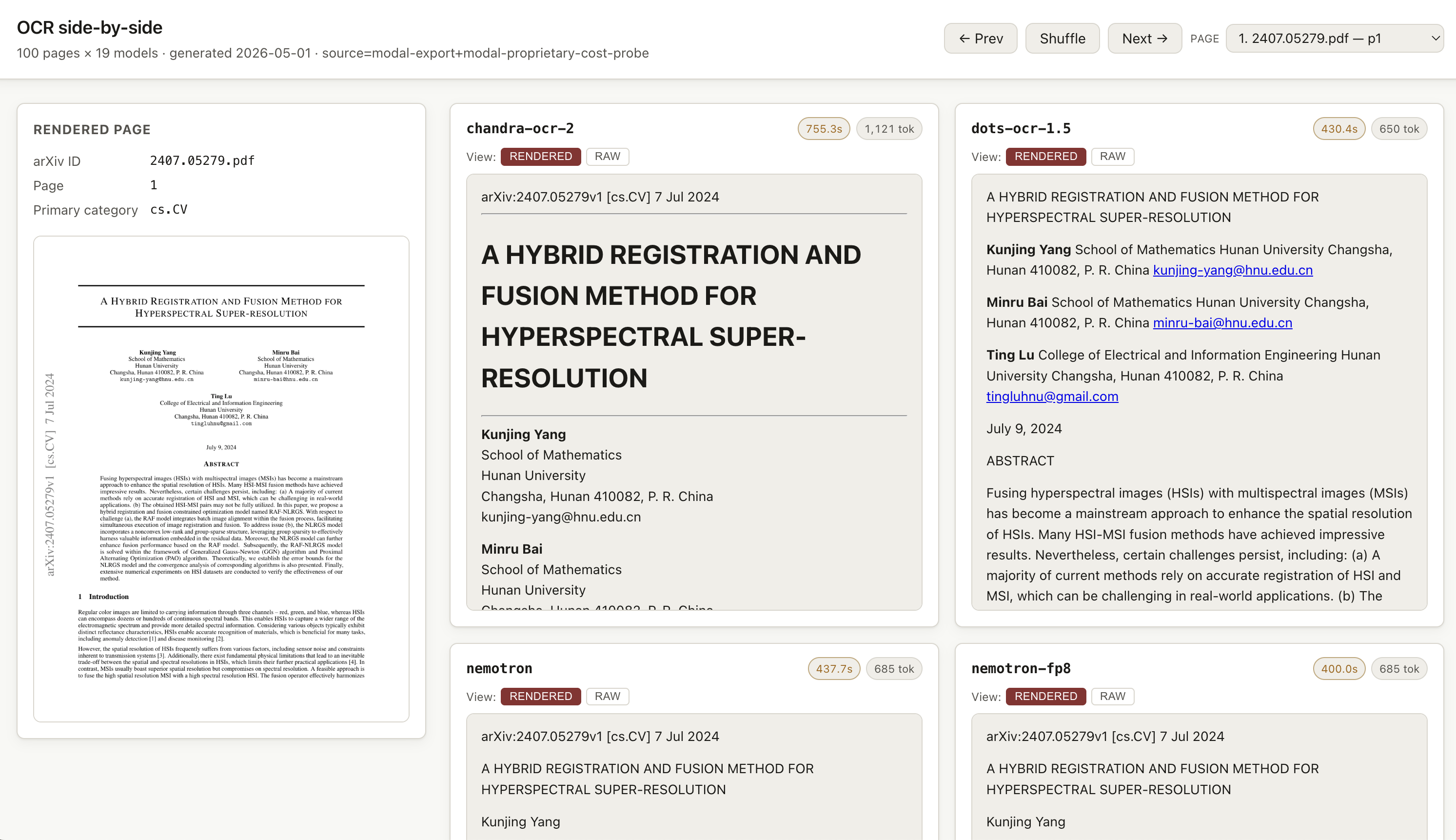
So we used the public benchmarks to pick candidates, then judged the shortlist the way you’d actually judge it before shipping: by reading the output. We built a side-by-side viewer and spent real time in it. The verdict and per-model recommendations live there, next to the evidence. If quality is mission-critical for your workload, do the same — pull a representative sample, run it through your top 2–3 candidates, and have someone who knows the domain eyeball the results.
Modal basics
Modal is a good fit for this work because it makes GPU-backed serving much less painful than doing the same thing on AWS/GCP/Azure from scratch. On a hyperscaler, serving a single GPU-backed model typically means: picking a GPU instance family with the right capacity and availability, wrestling CUDA drivers into the base image, wiring up autoscaling and cold-start handling, standing up a container registry, piping in secrets via IAM or a parameter store, and mounting some kind of network volume so you aren’t re-downloading 50+ GB of weights on every boot. Each of those is a half-day task in its own right, and most of them are about cloud plumbing rather than the model you actually want to serve.
Modal collapses most of that into a single Python file. The basic pattern is simple:
- stage model weights into a persistent Volume
- mount that Volume into a GPU-backed container
- start the serving engine during container startup
- expose the service over a normal HTTP interface
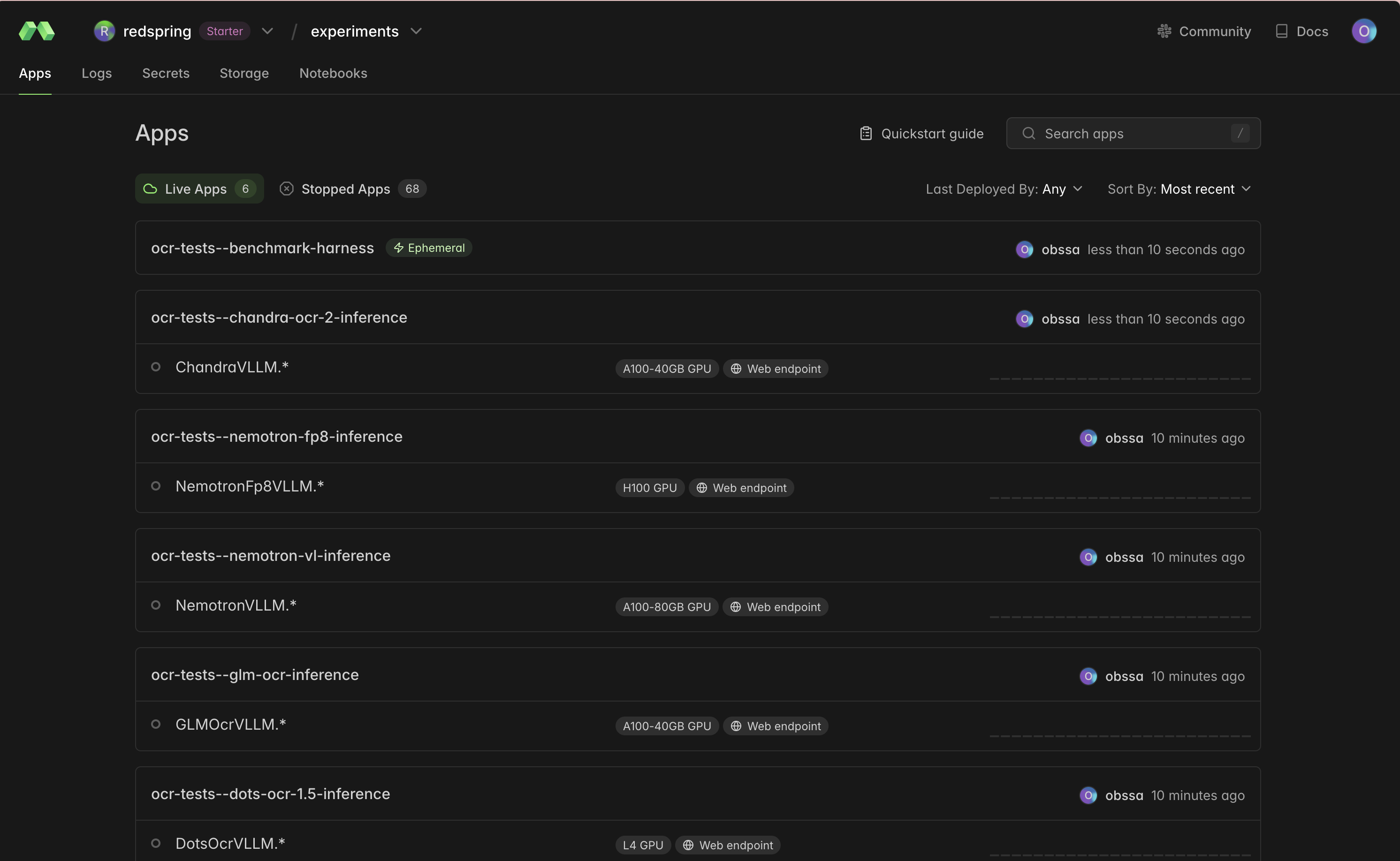
For batch-style setup work, like downloading Hugging Face weights into durable storage, we used one-off functions. For serving, we used a GPU-backed class that launched the engine as a subprocess during startup and exposed a web server once the container was ready.
Here’s the rough shape:
volume = modal.Volume.from_name("dots-ocr-1.5-assets", create_if_missing=True)

@app.function(
    image=image,
    secrets=[modal.Secret.from_name("hf-secret")],
    volumes={"/models": volume},
)
def upload_model_to_volume() -> None:
    snapshot_download(..., local_dir="/models/dots.ocr-1.5")
    volume.commit()
And for a long-lived service:
@app.cls(
    image=vllm_image,
    gpu="L4",
    volumes={"/models": model_volume, "/root/.cache/vllm": vllm_cache_volume},
    scaledown_window=300,
    min_containers=0,
)
class DotsOcrVLLM:
    @modal.enter()
    def startup(self) -> None:
        self.process = subprocess.Popen(["vllm", "serve", ...])

    @modal.web_server(8000, startup_timeout=900, label="dots-ocr-1-5-vllm")
    def serve(self) -> None:
        pass
A few details mattered. Each of these corresponds to a platform primitive that, if it didn’t exist, you’d have to build yourself on a generic cloud:
Volumes. A Modal Volume is a persistent, mountable filesystem shared across functions and containers. Model weights for a VLM run 20–200+ GB; downloading them on every container start would blow the cold-start budget and rack up egress from model stores like Hugging Face. Staging weights into a Volume once and mounting it read-only at runtime means each new container sees the weights as local disk in a fraction of a second.
Secrets. Modal Secrets are named, server-side key-value bundles you reference by name and inject as environment variables at runtime. We used them for things like HF_TOKEN so credentials never landed in the image, the repo, or local shell history. Rotating a secret is a single CLI call; no rebuild required.
Scaling controls. min_containers, max_containers, and scaledown_window let you trade idle cost against cold starts — a warm container eats GPU-time until it scales down, a cold one pays the model-load penalty on the next request. For benchmarking we set max_containers=1 so the system would stay on a single container rather than auto-scaling to absorb our synthetic load, which would have made throughput measurements unreadable. We also usually killed containers right after a run to avoid paying for idle time. In production, the same two knobs let you pre-warm for SLA-sensitive traffic or go fully scale-to-zero for batch windows.
That’s enough infrastructure to make the experiments reproducible without turning this post into a deployment manual.
Benchmark Methodology
The basic idea was straightforward: load a corpus of PDFs, send one OCR request per page until the sample run is complete, and measure throughput under different concurrency levels. Combined with measured pages-per-second-per-GPU and Modal’s on-demand pricing, that gave us a reasonable way to estimate cost and fleet size for a 100,000-page run before we accidentally emptied our bank accounts.
Concretely, we:
- ran the same models across multiple GPU types
- swept through concurrency levels to determine max GPU throughput
- evaluated the results quantitatively (speed, cost) and qualitatively (output fidelity)
One important setup detail: we pre-rasterized the PDF pages into images as a cheap one-off job before the main OCR benchmarks. That kept the benchmark focused on the part we actually cared about — model serving throughput and GPU cost — rather than letting PDF rendering dominate or add noise to the measurements. In a real production pipeline, you would still need to account for rendering, storage, and orchestration, but those costs are much smaller and easier to optimize than GPU-backed model inference.
We did not run every model/configuration as a literal 100,000-page end-to-end job. Instead, we used representative benchmark samples and combined the measured throughput with public pricing to estimate full-run cost. For planning and comparison, that was good enough. As we got closer to the final run, we moved from single-container spot checks to multi-container H100 runs of 5,000–20,000 pages so the extrapolation would reflect production fleet behavior rather than individual GPU performance. After those multi-container H100 runs gave us a configuration we trusted, we ran the full 100,000-page job with that setup.
Results
The rest of this section walks through these three axes in order: quality (is the output any good?), throughput and cost (can we afford it at scale?), and proprietary-API comparison (is it worth self-hosting at all?).
Assessing quality: the side-by-side viewer
Before any of the cost numbers mean anything, you have to answer the obvious question: does this model actually read the page right? So we built a small static viewer that lets you flip through individual pages and compare every model’s OCR output against the rendered original, side-by-side. Best on desktop.
Open the OCR Results Viewer in a new tab →
Our verdict after spending real time in the viewer:
- Reach for Chandra when fidelity is paramount. It’s our top pick on accuracy, and the lead is most visible on tables and complex formatting where the others start dropping cells or mangling structure. Good fit for compliance-sensitive documents, archive digitization, or anything downstream that assumes the text is trustworthy.
- Reach for
dots.ocr-1.5when throughput or cost is the binding constraint. It’s a very close second on quality and a runaway winner on cost-per-page — the right call when the downstream consumer is another model (RAG indexing, classification, summarization, agentic workflows) that can absorb a little OCR noise.
Both are genuinely strong; the pick is about which axis you’re optimizing. And don’t sleep on the Qwen variants in the viewer — they weren’t purpose-built for OCR and still hold up better than we expected. The viewer exists precisely so you don’t have to take our verdict, the public leaderboards, or the cost tables below on faith.
Self-hosted cost to process 100k pages
The headline run used a fleet of 60 H100s handling 200 concurrent requests. It submitted 100,056 pages, completed 98,159, and sustained 28.96 submitted pages/s — finishing in 56.5 minutes at $223.10 of measured GPU cost. Normalized over successful pages, that’s $2.27 per 1,000 pages, at a failure rate just under 2%.
We didn’t jump straight to 60 GPUs. Before committing to the full job, we ran a few smaller multi-container H100 sweeps with dots.ocr-1.5 to establish a throughput-and-cost baseline we trusted enough to extrapolate from:
| Profile | Sample | Throughput | Observed cost | 100K projection |
|---|---|---|---|---|
| 40×H100, c=160 | 5,000 submitted, 4,911 ok | 18.95 pages/s | $11.37 total | ~88–90m, ~$227–232 |
| 40×H100, c=120 | 5,000 submitted, 4,980 ok | 21.77 pages/s | $10.04 total | ~77m, ~$202 |
The next table is a compact view of model x GPU sweeps. It does not list every concurrency setting we tested; instead, it normalizes each run down to the best per-GPU throughput and the estimated 100K-page cost that mattered for choosing the final profile.
| Model / profile | Throughput | 100K cost | Notes |
|---|---|---|---|
| Dots OCR 1.5 on H100 | 0.39 pages/s/GPU | ~$281 | Best single-GPU Dots profile |
| Dots OCR 1.5 on A100 | 0.19 pages/s/GPU | ~$312 | Cheaper GPU, about half H100 throughput |
| Dots OCR 1.5 on L4 | 0.07 pages/s/GPU | ~$325 | Similar cost band, ~5–6× slower |
| Chandra on A100 | 0.06 pages/s/GPU | ~$935 | Best quality, much slower and costlier |
| Nemotron-FP8 on H100 | 0.17 pages/s/GPU | ~$646 | Quantization helped, still behind Dots |
| Qwen3.5-35B-FP8 on H100 | 0.05 pages/s/GPU | ~$2,032 | Not viable for this OCR workload |
These estimates used Modal’s pricing at the time of publishing and the formula:
Pricing assumptions used here:
L4 = $0.000222/sL40S = $0.000542/sA100(40GB)= $0.000583/sA100-80GB = $0.000694/sH100 = $0.001097/sH200 = $0.001261/sB200 = $0.001736/s
Proprietary API price-sheet comparison
We include proprietary API pricing as context, not as an argument for the APIs. The thing worth scrutinizing isn’t the per-page number; it’s the dependency you take on when one vendor owns both the model and the price sheet.
The shape of the comparison is a vise. The frontier models that match or beat our open-source picks on quality — Claude Opus 4.8, GPT-5.5 — cost roughly $4,000 and $6,000 for the same 100k-page run, 18–27× our self-hosted cost. The proprietary models that get close to our cost, like gpt-5.4-nano and gpt-4.1-mini, aren’t quality-competitive: in our review they were the ones most prone to quietly rewriting text. The example below is representative. The source sentence says researchers run registration and fusion concurrently; gpt-5.4-nano invented a different claim entirely, lifting the phrase “dynamic gradient sparsity property” from the next sentence and presenting it as the method. Nothing in the output signals that it’s wrong — which is exactly what makes it dangerous.
chandra-ocr-2 and dots.ocr-1.5)
To address the complexities of image registration task, certain researchers endeavor to execute registration and fusion processes concurrently.
gpt-5.4-nano)
To address the complexities of image registration task, certain researchers endeavor to implement a dynamic gradient sparsity property.
To sanity-check the earlier token-budget estimates, we also ran a sample of our own pages through several proprietary models and recorded the provider-reported costs. Extrapolating from those observed costs, this is what the same 100,000-page workload would look like.
| Model | Observed cost/page from sample | Extrapolated 100K cost |
|---|---|---|
OpenAI gpt-5.4-nano | $0.0012 | ~$120 |
OpenAI gpt-4.1-mini | $0.0020 | ~$200 |
OpenAI gpt-5.4-mini | $0.0046 | ~$460 |
Anthropic Claude Haiku 4.5 | $0.0051 | ~$510 |
OpenAI gpt-4.1 | $0.0069 | ~$690 |
OpenAI gpt-5.4 | $0.02 | ~$2,000 |
Anthropic Claude Sonnet 4.6 | $0.02 | ~$2,000 |
Anthropic Claude Opus 4.6 | $0.03 | ~$3,000 |
Anthropic Claude Opus 4.8 | $0.04 | ~$4,000 |
OpenAI gpt-5.5 | $0.06 | ~$6,000 |
OpenAI gpt-5.4-pro | $0.65 | ~$65,000 |
OpenAI gpt-5.5-pro | $0.94 | ~$94,000 |
Two things to take away from the table. First, read it by quality tier, not by price: the cheap rows ($120–$510) are not substitutes for dots.ocr-1.5 or Chandra, because they’re the ones that hallucinate. Second, once you filter to genuinely comparable quality, the proprietary cost sits an order of magnitude or more above our $223 self-hosted run. Batch APIs can narrow that gap for jobs you’re willing to defer, but a batch endpoint is a different product the moment you need predictable sub-hour completion.
What the API comparison misses
The broad takeaway is simpler than a head-to-head matrix: self-hosted VLMs on Modal are often competitive on run cost for comparable-quality OCR, and the dollar figure is the least of it. With the propietary APIs, the cheaper model you built around can get more expensive or retired out from under you. Self-hosting trades that exposure for stronger guarantees and choices you can make around:
- The deployment knobs. You choose the model, GPU, engine, concurrency, batching strategy, and fleet size. With an API, the highest-leverage knobs belong to the vendor.
- The deadline trade-off. Finishing faster is a visible capacity decision: add GPUs, pick a different GPU class, tune the server. With APIs, sub-hour throughput depends on account tiers, rate limits, and provider capacity.
- Where the data goes. For OCR workloads, the input is often the sensitive part. Running in your own Modal account changes the privacy and compliance conversation.
If OCR is becoming core infrastructure for your product or business, owning the serving path matters.
What we learned
1. Benchmark your workload, not somebody else’s
It’s tempting to read a leaderboard, take the top row, and move on. Sometimes that’s right. Sometimes it’s exactly wrong — two of our public-ranking favorites lost once we measured them on our own pages.
What actually decides the winner is the shape of your workload: document type, token mix, output length, preprocessing path, concurrency, and the precise quality threshold you need. OCR is a particularly nasty case because it pairs heavy image inputs with long text outputs, so a model that’s fast on chat-style traffic can fall over here. The leaderboard tells you who to test; your own pages tell you who to ship.
2. GPU price and SLA have to be evaluated together
On paper, an L4 or L40S is far cheaper per second than an H100. In practice that’s a trap, because per-second price and time-to-finish trade off against each other. Our measured dots.ocr-1.5 rows make it concrete: the L4 landed in roughly the same cost-per-page band as the H100 while running ~5–6× slower. So the cheap GPU buys you nothing on cost and costs you a one-to-two-hour job turning into an overnight one. The right pick is a function of your deadline: a loose SLA makes a low-end GPU perfectly sensible, a tight one justifies the H100 even at a higher sticker price. We chose H100s for the final run on that basis — best cost/time trade-off, not cheapest line item.
3. Quantization is worth taking seriously
We started out mildly skeptical that FP8 would hold quality without leaving performance on the table. The data didn’t support the skepticism. The clearest case from the later sweeps is Nemotron, holding everything else constant:
- BF16 on
H100: ~0.10 pages/s, ~$1,100 per 100k pages. - FP8 on
H100: ~0.17 pages/s, ~$650 per 100k pages.
That’s a ~70% throughput gain and a ~40% cost cut from a single knob. It wasn’t enough to make Nemotron beat dots.ocr-1.5 for this workload, but that’s the narrow point. The broad one is that quantization is a real, near-free lever on both throughput and cost, and it belongs in the production search space rather than the “maybe later” pile.
Conclusion
We went in curious about two things: how good open-source OCR VLMs have actually gotten, and how much effort it really takes to run them at scale. The answers turned out to be “very” and “less than we expected.” 100,000 pages, 56 minutes, $223, on infrastructure we stood up in an afternoon.
Hosted APIs are the right default for prototypes and one-off product work, and we’ll keep using them there. But “default” isn’t the same as “neutral.” The moment you care about throughput, cost control, batch windows, data residency, or tuning the system around a specific workload, the calculus shifts toward owning the serving path. Self-hosting isn’t always the cheapest line on a price sheet, but for comparable-quality OCR at volume it was both cheaper and more controllable — and the operational know-how you build along the way is itself a moat that compounds.
That’s the part we’d underline for anyone weighing this: owning the model layer gives you direct control over the variables that decide whether something works in production — performance, cost, quality, and predictability — instead of renting them from a vendor whose incentives aren’t yours.
And we don’t think $223 is the floor. Newer serving engines, more aggressive quantization, and more careful tuning all point downward from here. We’ll keep tracking the state of the art; our guess is there’s still meaningful headroom left.
Useful references: